
Planner Release Notes V2.5
📈 Upgraded Schedule Calculation
In the Planner's scheduling calculation, there are many places where the Planner makes decisions about the right way to balance all of your assumptions (e.g., rig/frac crew utilization, gaps between activity relationships, date or priority overrides, asset prioritization, etc.), while still creating a schedule that makes sense intuitively.
After running the scheduling calculation against a wide variety of plans, sometimes the Pod2 team notices areas where the results seem like they could be improved in some way. In those cases, we always try to figure out ways to improve the calculation itself.
Recently the team noticed a situation where schedules had larger delays than expected between related activities (e.g., between drilling and frac) when certain overrides were used. Planner 2.5 includes an upgraded schedule calculation that should reduce delays in certain situations like this.
What does the upgraded calculation mean for you?
If you're not using any date or priority overrides, your schedule will stay the same with the upgraded calculation.
If you're using date or priority overrides, some activities may move around to reduce gaps when you upgrade to the new calculation. This should provide better results in general, but it might be necessary to adjust your schedule after upgrading. For example, short-term economics might change slightly because of activities being moved during the upgrade, so you may want adjust it further.
Your plan won't switch to the upgraded calculation automatically. Instead your plan will continue using the previous calculation (from Planner 2.4) until you opt-in to the upgraded calculation under "Calculation Settings" in the "Settings" tab:

The previous version of the calculation will remain available temporarily to allow for some time to upgrade to the new calculation. Eventually it will be removed as everyone switches over to the upgraded calculation.
We plan to follow the same strategy for any future calculation changes, so you can upgrade to each change as you're ready. Please reach out if you need help switching to the upgraded calculation, or see any changes in the upgraded calculation that you'd like to better understand.
🎨 Activity/Group Color Picker
We know colors are extremely important to visualizing and understanding your schedules, so Planner 2.5 includes a new option to choose specific colors from a color palette if you'd like to choose certain colors for activities/groups:

The previous random color button has been moved under the palette, so you can still allow the Planner to rotate through random colors if you'd like. The Planner will remember the colors you choose, even if you change the "Activity Color" selection to something else.
📋 Copy/Paste Lookup Tables
When lookup tables were first introduced in the Planner, we offered the ability to build tables manually in the interface or import from an Excel template. Sometimes you want to make bulk updates to an existing table though, in which case the Excel template might not work well (e.g., if you didn't save the existing table in Excel).
Planner 2.5 allows you to copy a lookup table to your clipboard and paste it back in, so you can quickly make bulk updates in Excel:
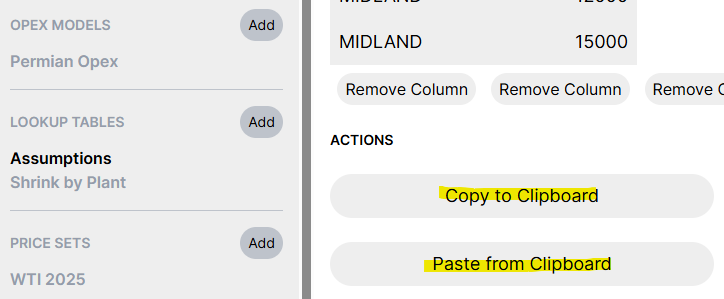
The copy/paste format also the existing lookup table Excel import format.
📩 Parquet and Spotfire Scenario Name Column Changes
Sometimes it's convenient to use existing folders for scenarios instead of using partitions in the Parquet export or grouping the files in the Spotfire export. In these cases you might still want to include the scenario name column though, so some people worked around this by manually copying files into different folders.
Planner 2.5 has a new option to include the scenario name without using partitions (Parquet)/groups (Spotfire) to avoid copying files manually:

This should make it possible to set up dashboards pointing at specific folders created ahead of time, so loading new scenarios into your dashboard should be as simple as clicking "export" in the Planner. Please reach out if you'd like any help setting up your dashboards to work like this.
✅ Well Readiness Changes
When the first version of readiness tracking was released, the Planner enabled people to view wells/pads by the milestone that they've reached (e.g., "Ready to Drill"). This is really useful for planning, for example when you're re-prioritizing locations and you need to quickly understand which pads are ready to drill.
From early adopter feedback, we've heard that many operators would also like to see which "phase" the well is currently in (i.e., which milestone is being worked towards) for operations. Planner 2.5 adds phases between each milestone:
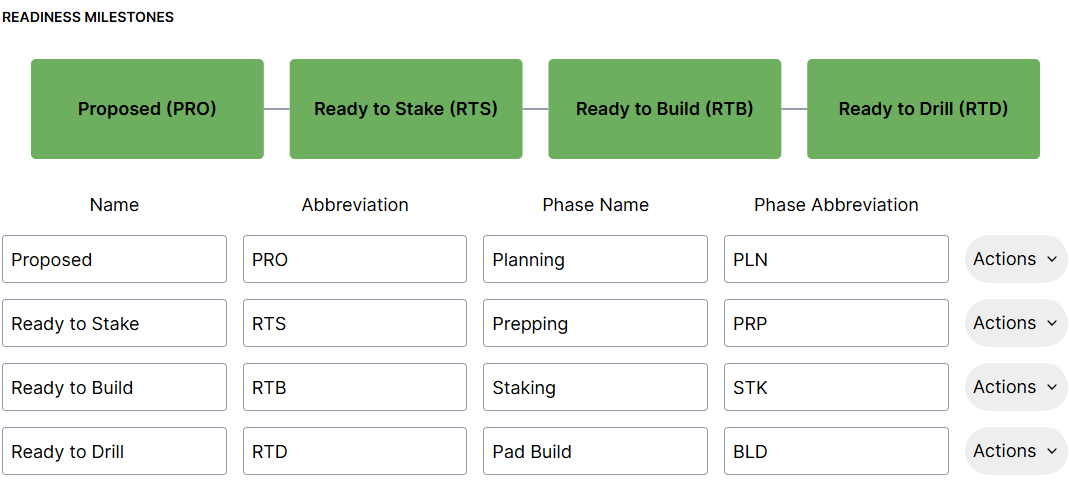
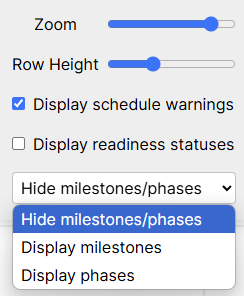
You can switch between displaying phases vs. milestones in the schedule:
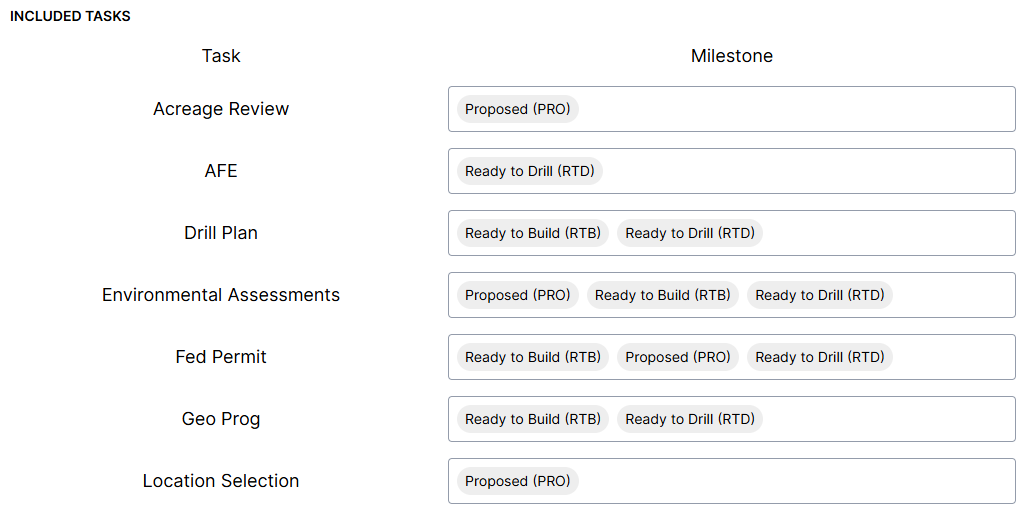
Planner 2.5 also includes the ability to track readiness tasks that span multiple milestones. This is useful for tracking long-lead items, when you want to view the statuses of these tasks but don't want the tasks to block certain milestones from being reached. For example, you might want to start thinking about facility build-out early on in the process and check it's status, but not affect certain milestones.
Tasks can now be associated with multiple milestones, and their incomplete statuses won't prevent earlier milestones from being reached (i.e., they will only block the last milestone):
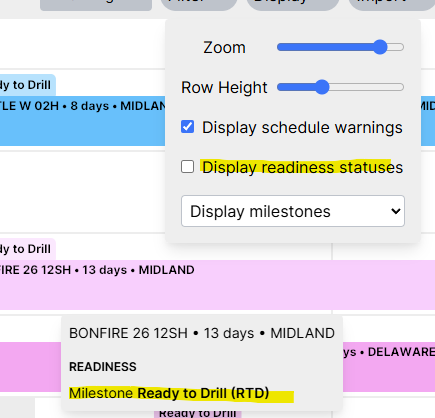
We've also heard from people that they'd like the option to hide readiness statuses from the activity hover when readiness statuses. To make this consistent with some of the other display options, Planner 2.5 will hide readiness statuses from the activity hover when statuses aren't being shown on the schedule:
🔔 Notifications and Help
Planner 2.5 adds a notification list and a link to the Planner documentation/help site:
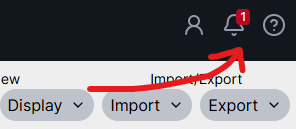
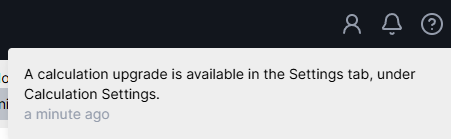
The notifications will be used to let you know when certain functionality is available. For example, the calculation change mentioned in these release notes will also be included as a notification in case anyone misses the release notes. Certain notifications like the calculation change are also plan-specific, so this can be a useful reminder about the calculation upgrade for each plan when working with multiple plans.
📤 Enersight Export Improvements
If you use the Planner's Enersight integration, previously you might've noticed that resource names weren't included on the exported activities under Enersight's "Schedule Data" tab.
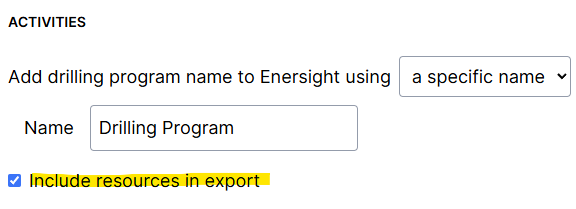
Planner 2.5 includes an option to include resource names for activities during export. This allows the resource name to be shown under "Schedule Data", and also makes it possible to view your activities in some other places within Enersight (certain reports, Enersight Gantt chart, etc.).
There are other improvements to prepare for some upcoming changes in the next release, but those are all of the release highlights for now!