
Schedule Warnings
With lots of flexibility around drag & drop and the ability to override scheduling assumptions, comes the need to warn you when critical rules are broken.
For example, the Planner could let you know when you start a frac activity before drilling is finished, or have two drilling activities on a single drilling rig on your schedule.

The orange wavy line under activities let you know if there's a warning. Even when you're zoomed out, these lines are relatively easy to spot, so you can quickly glance at your schedule to see if there are any problems. When you hover over an activity with these orange lines, you'll see a detailed list of warnings affecting that activity.
The kinds of warnings currently supported are:
- Activities scheduled in the wrong order, e.g., frac starting before drilling is finished
- Activity scheduled on the wrong resource, e.g., frac activity dragged onto a drilling rig
- Resource overcapacity, e.g., two drilling activities overlap on the same drilling rig
- Activity scheduled while resource is unavailability, e.g., drilling while the drilling rig is unavailable
- Simultaneous operations even though a restriction disallows it, e.g., manually scheduled frac to happen while drilling nearby
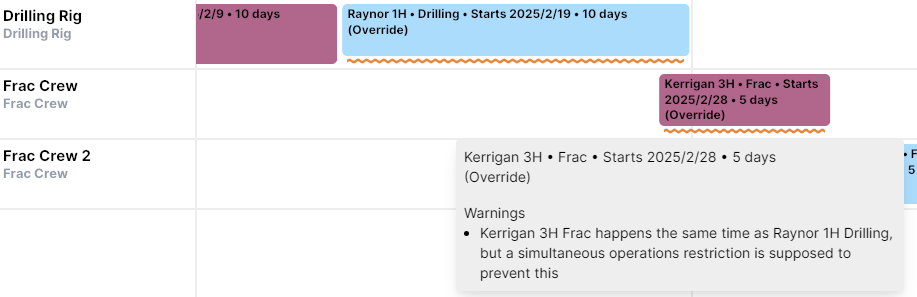
As always, the Planner will always try to generate schedules with no warnings. Because of this, you'll only see warnings when overriding start dates in a way that the Planner can't schedule around them, or for very complicated schedules that are over-constrained (e.g., there might not be a feasible schedule at all).
If you don't want to see warnings at all, or just want to hide them temporarily, there's a new option to hide warnings under "Display":