
Planner Release Notes V2.1
This release is focused on expanding production modeling capabilities (base production, shrink), usability improvements, and performance enhancements. Check out the highlights from this release below!
Planner Version 2.1
🗺️ Offset Activity Interference
Planner version 2 added simops restrictions that allow you to set up rules to avoid activities while other activities
are happening nearby (e.g., avoid drilling while a frac is happening within some
radius).
While simops restrictions is great on its own, a lot of operators were also interested in similar functionality that would allow them to shut-in nearby producing wells. Some operators would perform this analysis outside of the Planner even though it had a large impact on their overall schedule and economics. This kind of schedule-driven interference calculation was on the roadmap since the early days of the Planner, so version 2.1 seemed like a natural time to add it.
Planner version 2.1 introduces new functionality for "Offset Activity Interference"
(a.k.a production interference, offset frac interference, shut-in due to frac, frac hits, frac slaps). This allows
you to automatically shut-in well production during certain types of nearby activities. For example, if you know a
frac is happening nearby, you can shut-in production for all wells producing from that formation.
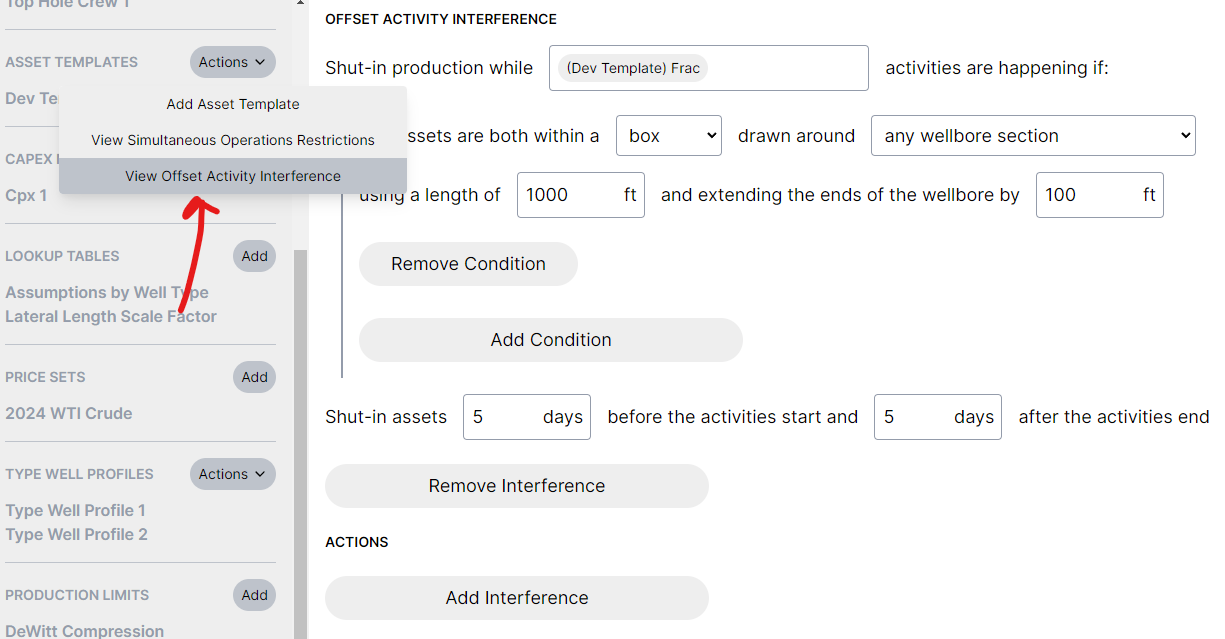
You can specify offset activity interference rules through Asset Template actions (in the Assumptions tab). The conditions work the same way as simops restrictions, and you can also specify how many days before and after the activity that the shut-in should apply.
Just like production limits, offset activity interference causes production to be curtailed during the interference period, which basically defers production through time.
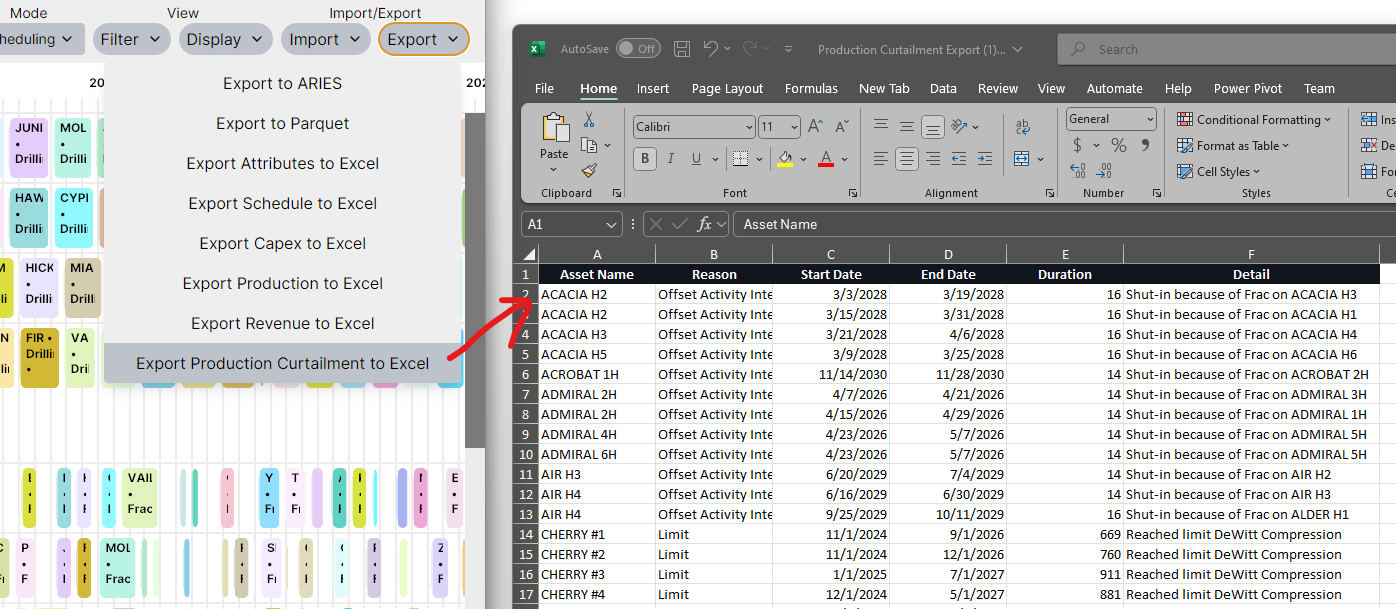
If the Planner automatically shuts in well production, then you probably also want to know which
wells it shut in. Planner v2.1 adds a new "Production Curtailment" export that contains any curtailment that was
applied to your plan. This currently includes both offset activity interference shut-ins (which well caused it to be
shut in) and production limits (which limit was reached).
We also changed "Limited" production to "Curtailed" to highlight how the results include curtailment effects from both production limits and interference.

To support accurate interference curtailment (within the month), we've updated both the potential production and curtailment production calculations to be able to calculate production at a finer granularity than month boundaries.
This improved accuracy might slightly impact your production results from month-to-month, but annual totals should be approximately the same.
📉 Base Production
"Offset activity interference sounds great, but I don't have my well-level base production in my plan"
"I wish I could see total revenue across my producing wells too"
Great news! We heard you loud and clear: Planner v2.1 improves support for base production, so
you can:
-
understand the effects of offset activity interference on your base wells
-
view total metrics across both development and base wells (especially revenue!)
So how does it work?
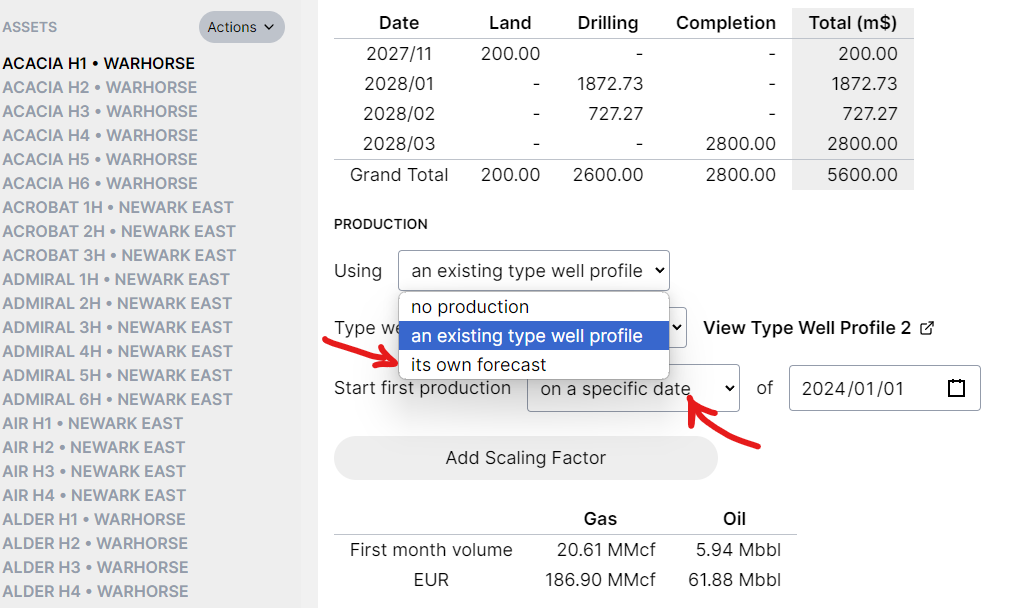
Previous versions of the Planner would allow you to use a type well profile for base wells, but at some point you'd usually want the well to use its own forecast. In v2.1 you can import base well forecasts directly, without using a type well profile.
You can also specify a specific date to begin the forecast, instead of letting it be driven by the schedule.
Here's what the new asset forecast import looks like:
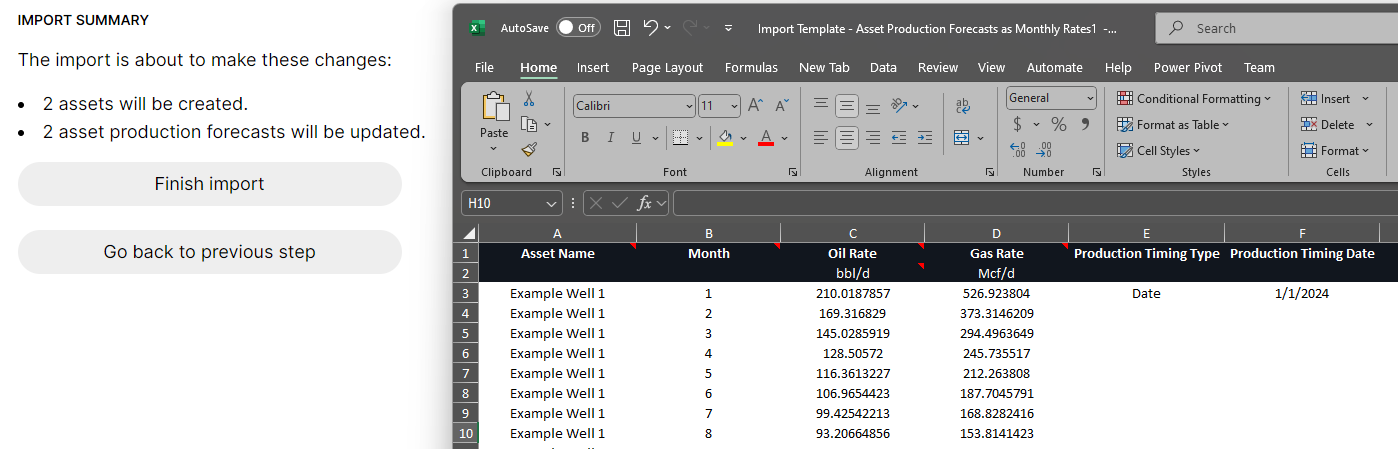
The production timing columns are optional, but you can include them here if you'd like to set a start date. You can also include those columns in the existing header import instead if you'd like.
As you can probably tell from the screenshots, the point at which you consider a well a "scheduled well" versus a "base well" is completely up to you. These capabilities allow you to incrementally move onto different forecasts or specify dates whenever is best for your existing workflow. We really wanted to make it as easy as possible to move a well off of the schedule as you consider it to be part of base production.
Improved support for base production was always in the roadmap for the Planner. It was naturally included into the same release as offset activity interference, so people can better understand how production interference affects their base wells (not just scheduled wells).
🤏 Gas Shrinkage
A lot of people mentioned that they'd like to import raw gas forecasts but still calculate accurate revenue results. To do this, they needed to be able to bring in gas shrinkage to calculate revenue on shrunk volumes.
Version 2.1 adds support for gas shrink:
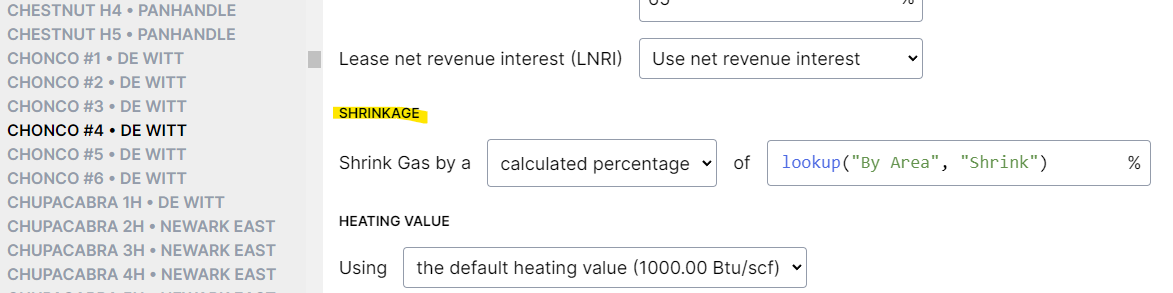
Gas shrink can be specified as a fixed percentage ("10%") or calculated from a formula (e.g., look up the shrink based on an area or facility).
Shrink can also be imported in bulk with the existing headers import:

Some changes were made to the existing production exports to support sales/shrunk volumes. Currently gross gas volumes are wellhead/raw gas, while net gas volumes are sales/shrunk gas. This applies to both Excel and Parquet exports.
Metrics were also changed to support gas shrinkage. On gas and BOE production metrics, you can specify whether you'd like wellhead versus sales volumes:
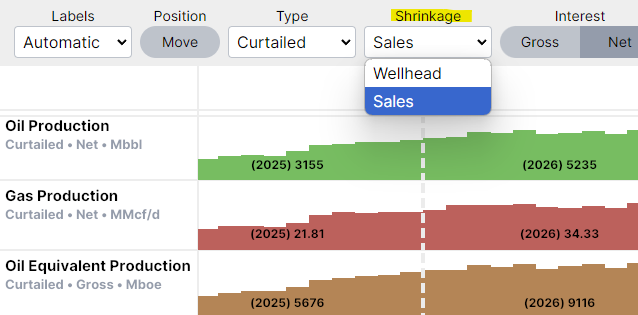
Of course, nothing changes if you don't use shrinkage (wellhead and sales volumes are the same), so it's up to you whether you'd like to include gas shrink or import shrunk forecasts.
Support for gas shrink was always planned from the beginning, but it made sense to include it in version 2.1 as a follow-up to revenue being added in version 2.0.
📤 Excel Headers Improvements
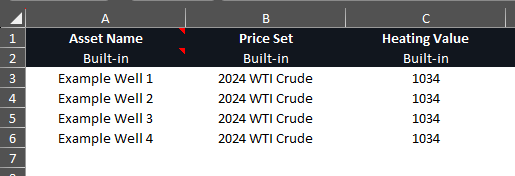
Although it was possible to specify a default price set and heating value, sometimes you want to be able to set
specific price sets and heating values in bulk for all the wells in your plan.
Version 2.1 adds these into the Excel header import, so you can easily set these in bulk:
🏎️ Performance
A significant amount of the version 2.1 development time was dedicated to performance optimizations,
especially to support real-time offset activity interference curtailment. We also have a long list of other
performance optimizations we'd like to work through over the next several
releases.
The Planner will continue to become faster every release, and we will continue to benchmark any changes to catch potential performance regressions.
We know how important it is to be able to plan in real-time, and that won't change. Performance improvements like this make it possible to continue adding new capabilities into the calculation (base production, offset activity interference, shrink) while running
faster than previous releases.
That's all of the release highlights for now! Please let us know if you have any questions or would like help integrating any of this new functionality into your plans.
We're extremely grateful for all of the early feedback about the design of the new capabilities in this release. Thank you for your trust and support as we build the next evolution of operational scheduling and field development planning technology.
If you haven’t tried out the Planner yet, are you ready for a free trial to see how the Planner could help you with your next planning cycle? Onboarding is simple, and we'll get you up and running quickly.